
For restaurants & wine bars in Hong Kong
A sommelier at every table. Even on a Tuesday.
Guests scan the table, answer six quick questions, and get three bottles from your own list — each with a story they can check. You choose what gets pushed tonight.
Why not your POS's QR menu
Your POS menu was built for fried rice.
Your wine list deserves better.
Scan-to-order is great for dumplings. For a Barolo it's a spreadsheet row with a plus button: no vintage, no story, nothing to help anyone choose — and it's the last thing a guest sees before they spend HK$1,480.
A typical POS QR menu
The same bottle, on Savvi
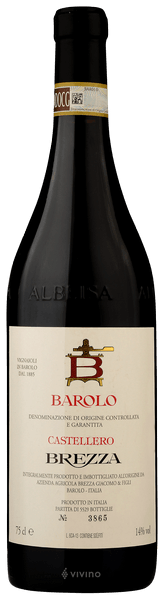
This is the bottle for a long, slow Sunday lunch with someone you actually want to keep talking to.
Wine is not a SKU
A POS gives a bottle one line and one price. Savvi knows the vintage, the glass and the bottle, and what's left.
It helps them choose
A plus button assumes the guest already knows. Most don't — so they order the house red.
It looks like your room
Set like a wine list, not a delivery app. And keep your POS — staff ring orders in exactly as today.
How it works
From your PDF to every table.
01 Send us your list
A PDF, a photo of the printed list, a spreadsheet. We do the typing.
02 We write every bottle
Photo, tasting notes in plain words, and a source behind every fact.
03 Guests scan the table
Browse the list or take the quiz. Three picks, all from your list.
What your list can do
Never out of date
Out of the Barolo? One tap and it greys out. No reprints.
Picks from your cellar
Every recommendation is a bottle you actually pour.
Notes with sources
Every fact on a card links to where it came from. Nothing invented.
Push what you choose
Feature a bottle tonight, or every Friday.
More like this
Loves the look, balks at the price? Three that taste alike.
The whole drinks list
Cocktails, sake and beer too. One QR, no paper.
Premium · The Cellar Coming soon
Know what sold, not just what they looked at.
A small box on your network reads the wine tickets your POS already prints. It doesn't touch your POS, and staff don't change a thing. You get live sales by table, stock that counts itself down, and the number that matters: how often a recommendation became a bottle.
Plans · per venue
No commission. No setup fee. Priced to your list.
The list
Menu & recommendations
- Digital wine & drinks list
- Palate quiz & three picks
- Sourced notes and photos
- One-tap 86
The table
Most venues
- Everything in The list
- Food pairing
- Push bottles you choose
- Guest analytics
The cellar
With the POS box
- Everything in The table
- Live sales from your POS
- Inventory by vintage
- Conversion by table
Every list is different. Tell us yours — venue, roughly how many wines, and which POS — and we'll send a quote within a day.
Ask for a quoteQuestions owners ask
We already have QR ordering on our POS.
Keep it for food. Savvi is the wine list that sits beside it — no switching, no retraining. Staff ring wine into your POS exactly as they do today.
Do you take a cut of each bottle?
No. A flat monthly fee per venue, whatever you sell.
My list changes every week.
Send us the new one, or mark a bottle out of stock yourself in one tap. Guests see the change straight away.
Do my guests need to download anything?
No. They scan the QR on the table and the list opens in their phone's browser.
What do you see about my guests — and what do I?
You see which wines were viewed, recommended and ordered at your venue, as totals. Guests' personal details stay with Savvi and are never sold. No table is ever shown another table's order.